Cascading Style Sheets (CSS)
Cascading Style Sheets (CSS) is the language used to style the contents of an HTML document. Like HTML, CSS is not a programming language. Instead, it is a stylesheet language that selects an HTML element then define how that HTML element should look. HTML provides the content of the webpage, CSS handles the look—that is layout, colors, fonts, and other visual elements.
The word "Cascading" means that the order of CSS rules matters, and it is governed by three principles:
- Specificity — If two CSS rules target the same element, the more specific rule wins (e.g. an ID selector takes precedence over a class selector).
- Source Order — If two rules have equal specificity, the one that appears last in the stylesheet is applied.
- Inheritance — Some CSS properties (like
font-familyandcolor) are passed down from parent elements to their children automatically, unless explicitly overridden.
When developing a simple website, writing plain CSS is straightforward and sufficient. For more complex projects, developers often reach for tools that build on top of CSS — such as SASS, Tailwind, or Bootstrap. These are not replacements for CSS; they extend or abstract it:
- SASS is a CSS preprocessor that adds features like variables, nesting, and mixins to CSS syntax, then compiles down to plain CSS.
- Tailwind is a utility-first CSS framework that lets you style elements using pre-built classes directly in your HTML.
- Bootstrap is a UI component framework that provides ready-made components and a grid system built on CSS.
The Three Ways to Apply CSS
There are 3 ways to use CSS to style the contents of an HTML document. While each has a different use case, the external approach is the industry standard.
| Method | Where it lives | Example |
|---|---|---|
| Inline | Directly inside an HTML tag. | <h1 style="color: blue;"> |
| Internal | Inside a <style> tag in-between the opening and closing <head> tags. | <style> h1 { color: blue; } </style> |
| External | In a separate .css file. | <link rel="stylesheet" href="style.css"> |
The inline and internal approach are good for basic website projects that can disregard tidiness in its development due to its simplicity e.g. a single page website. If a web project is more complicated and will have multiple webpages then the external approach is the wisest option to ensure the development is not messy.
CSS Syntax
To write CSS that correctly targets and styles an HTML document, certain rules called a "syntax" must be followed. CSS syntax comprises of the selector, declaration, property, and property value.
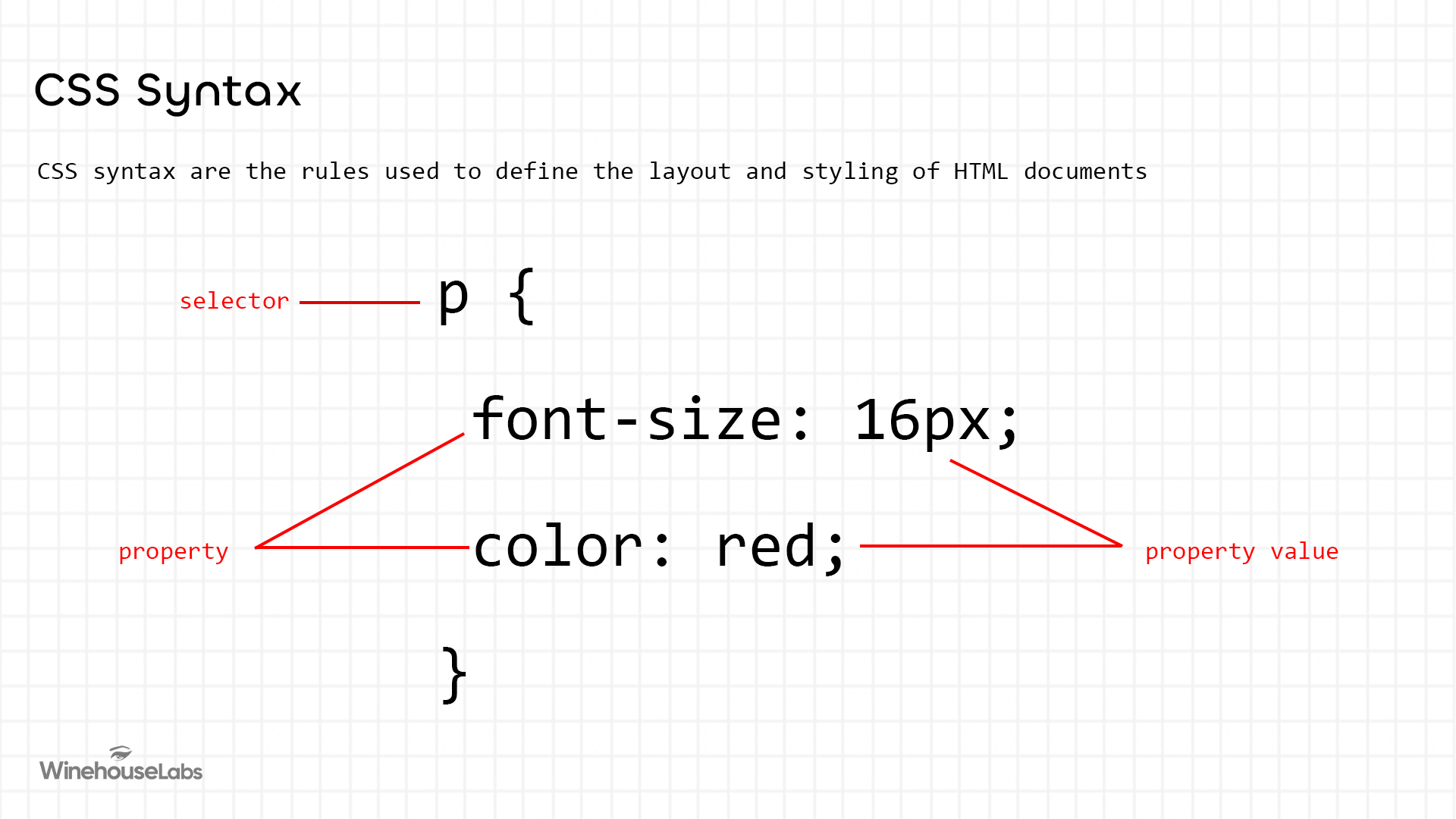
CSS Syntax Components
| Component | Definition | Example |
|---|---|---|
| Selector | The "target" that identifies which HTML element(s) to style. | h1 |
| Declaration | The entire block of code inside the curly braces { }. | { color: red; } |
| Property | The specific feature of the HTML element you want to change. | color |
| Property value | The value applied to the property to dictate the look or result you want | red |
CSS Selectors
To change the look of an HTML element, CSS needs to select this element in some way. This can be achieved in either of 3 ways:
| Selector Type | Syntax | Target Description |
|---|---|---|
| Tag Selector | HTML tag e.g. h1, p, div | Targets the HTML element using its tag (e.g., all <p> tags). |
| Class Selector | .styleMe | Targets as many HTML elements that has the class name styleMe |
| ID Selector | #idName | Targets one single, unique HTML element with the specific ID idName. |
CSS, like HTML, is a foundational technology of the web. Every website uses CSS regardless of what tools are in the stack — frameworks like SASS, Tailwind, and Bootstrap all build on top of it. Understanding CSS directly gives developers the foundation needed to use any of these tools effectively.